Adobe Acrobat QR Code Generator for a PDF
Adobe Acrobat has no QR code generator for links. To add a QR code to a PDF, make the image elsewhere and place it with Edit > Image in Standard or Pro, or as a pasted stamp in free Reader. Pro's barcode field encodes form answers, not links.
Adobe Acrobat has no QR code generator for links. To add a QR code to a PDF, make the image elsewhere and place it: Edit > Image in Standard or Pro, or a pasted stamp in free Reader. That holds for Reader, Standard, and Pro. Acrobat Pro can draw a barcode form field, and that field can use a QR symbol, but it encodes form answers, not a link you chose. Adobe's actual QR code generator is in Adobe Express.
A code on a PDF: generate the image, then paste it as a stamp (free Reader) or use Edit > Image (Standard, Pro). A code that opens a PDF: host the file, point a dynamic code at it.
Adobe Acrobat has no QR code generator for links, so the job in Acrobat is placing an image, and the steps are below. A code that opens a PDF is a hosting job instead: see how to make a QR code for a PDF.
How to create a QR code in Adobe Acrobat
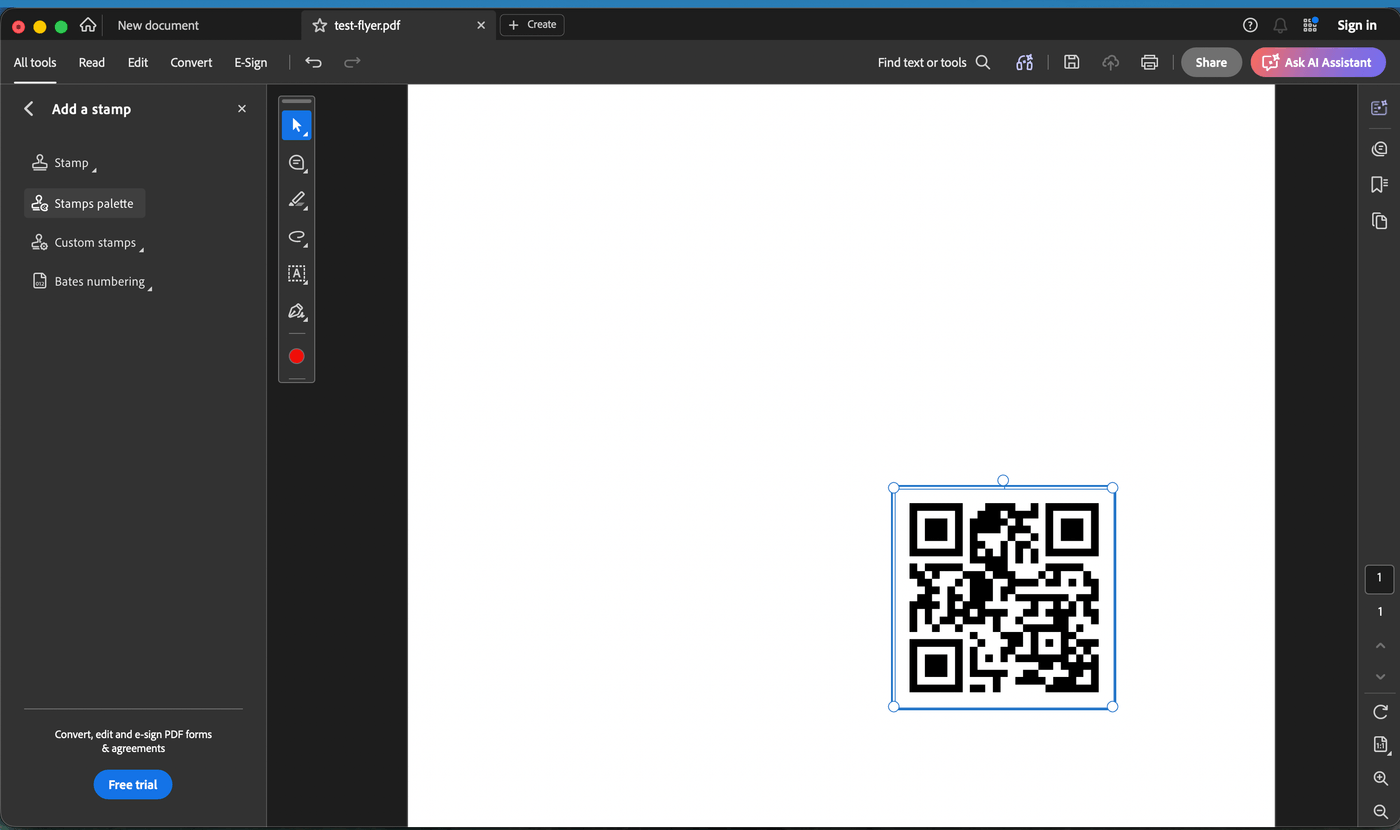
The flyer is already a PDF and it needs a code in the corner.
1/ Generate the code as an image. QRBliss exports one free, with no account. Use a PNG at 400px or larger so print does not soften the modules. SVG is sharper if you can place it before the PDF exists.
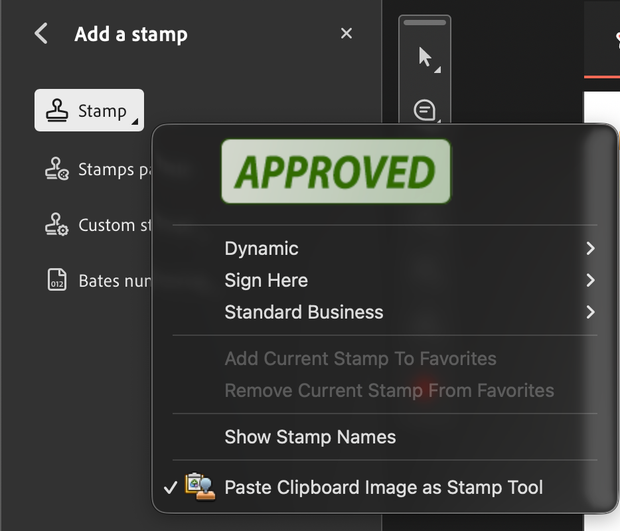
2/ Free Acrobat Reader: paste it as a stamp. Open the PNG and copy it (⌘C or Ctrl+C). In Reader choose All tools > Add a stamp > Stamp ▾ > Paste Clipboard Image as Stamp Tool, and click the page. The code lands at the image's pixel size, so a 400px PNG covers most of a letter page. Drag a corner down to size it. Tested in Reader 26, October 2026.
3/ Acrobat Standard or Pro: Edit > Image. Select Edit in the top bar, then Image. Pick the file, click to place, drag to size. In free Reader, Edit opens an Acrobat Pro upgrade page (US$24.98/mo billed annually, October 2026).
4/ The same code on many PDFs? Save it under Add a stamp > Custom stamps. After that it is two clicks.
A pasted stamp is a comment. If it is missing from a printout, set Comments & Forms to Document and Markups in the print dialog. Both paths want a raster file. For a code that stays sharp at any size, place an SVG in the source file (InDesign, or Word via Insert > Pictures) and export the PDF from there.
What Acrobat actually has: the barcode form field
Acrobat Pro's Prepare a form tool includes a barcode field next to text boxes and checkboxes. You draw the field, open Barcode Field Properties, and on the Options tab set the symbology to QR Code, PDF417, or Data Matrix. On the Value tab you pick which form fields get encoded. The symbol updates as someone fills the form. Print it, and a scanner can read the answers without retyping.
That is a data-capture feature. It is the wrong tool for "QR code for my website":
→ It encodes form data, or a calculation script, not a URL you type in → It needs Acrobat Pro and a fillable form → A scan returns field values, not an open page
If that is the feature you wanted, it is under Prepare a form, then Barcode. Turn on automatic field calculation in Preferences > Forms first, or the symbol will not update. Everyone else, use the steps above.
Where Adobe keeps the generator Acrobat does not have
Adobe's link-to-QR tool is in Adobe Express, under Quick actions. InDesign has a separate one at Object > Generate QR Code. Acrobat is not on that list. Which Creative Cloud app generates and which one only places is covered in does Adobe have a QR code generator?
Express and InDesign both write the URL into the pattern. The code is static: no edit after printing, no scan count. Acrobat does not even get that far. It places a picture.
Make a QR code that opens a PDF
The other reading of "acrobat qr code generator": a menu, spec sheet, or brochure, and a code on the table that opens it.
A QR pattern cannot contain the file. It holds text, usually a link. The PDF needs a URL, and the code points at that URL. The useful question is what happens when the PDF changes.
→ A static code aimed at menu-august-final-v2.pdf dies when the menu changes. You reprint the tents.
→ A dynamic code points at a redirect you control. Put the new PDF online, point the redirect at it, and the printed code still works.
The PDF QR code generator does that second path: paste the PDF's link (Google Drive, Dropbox, or your own site), make the code dynamic, and repoint it when the file changes. Scan counts by country and device tell you whether the tents are earning the print bill. The PDF walkthrough covers hosting from the start.
Static Adobe file vs. a code you can retarget
Express makes it, Acrobat places it, nobody can change it:
→ The PDF gets revised, and the printed codes still open the old file → "Did anyone scan the brochure?" has no answer → The next document means hunting through two Adobe apps again
The code is a link that happens to sit in the PDF:
- Generate a dynamic code with the PDF QR code generator. Fifteen free with a free account.
- Add a logo. AI Brand Sync matches a palette and checks contrast of at least 4.5:1.
- Export PNG for Acrobat, or SVG if you are still in the source file.
- Place it: a pasted stamp in Reader, Edit > Image in Standard or Pro, or place upstream and export.
- When the destination changes, edit the redirect. PDFs already in the wild keep working.
Acrobat vs. QRBliss
| Acrobat, with Express for the code | QRBliss | |
|---|---|---|
| Makes a QR from a link | Express only, account required | Yes, no account to start |
| Puts that image on a PDF | Yes, Add Image or a stamp | Yes, place the export |
| QR that opens a hosted PDF | You host it, and the code is static | You host it, and the code is dynamic |
| Editable after print | No | Yes, 15 free dynamic codes |
| Scan analytics | None | Counts, country, device |
| Logo and a contrast check | Manual | Automatic |
| Vector export | Express SVG | SVG, free |
Which job you actually have
- Form answers as a scannable pattern. Acrobat Pro does this. Prepare a form, Barcode, symbology set to QR Code.
- A code in the corner of a finished PDF, and the link will never change. Generate it in Adobe Express, then paste it as a stamp in Reader or use Edit > Image in Standard or Pro.
- A code that opens a PDF, or any code you will print in volume. Make it dynamic with the PDF QR code generator, place the file, and keep the destination editable after print day.
📌 What's shifted from 2024 to 2026: Acrobat still has no link generator. Adobe still routes that job through Express. A code on a menu is now expected to be swappable, and Acrobat still only places the picture.
For the wider field, see the 7 best free QR code generators.
Place the code → Make a PDF QR code (free) → Swap the PDF, not the print
Frequently asked questions
Is there an Adobe Acrobat QR code generator?
What is the barcode field in Acrobat Pro?
How do I add a QR code to a PDF in Acrobat?
How do I make a QR code that opens a PDF?
Are Adobe QR codes dynamic?
Create your first QR code.
Free tier. No signup required to start. Dynamic codes included.
Make a QR →